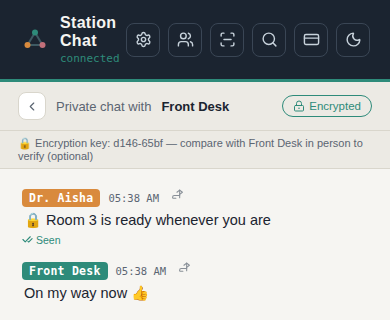
Private team communication — that stays on your network and keeps working when connections don't.
Group chat, durable direct messages, offline catch-up, files, voice and optional mobile push — without individual staff accounts or a central cloud chat server.
3 stations connected · Recent group history replicated
Built on a secure local mesh network
Your PCs communicate directly across the local network. Core chat doesn't depend on a cloud chat server, so staff can keep talking during an internet outage.
One connected team
Group conversations, private messages, files, voice messages, reactions, replies, mentions and presence — without staff creating individual accounts.
Real notifications when you're away
Receive push notifications on iPhone and Android even when Station Chat isn't open. Notification retention can be controlled by your administrator.
Your data stays under your control
Stored conversations and files are encrypted at rest, with optional end-to-end encryption for private conversations.
Stable Mobile is the recommended path for every device — Station Chat Local is there if you ever need to work without internet. Either way, the station itself keeps running — this is only about how a phone or browser finds it.
Staff scan the QR code shown by an authorized station and add Station Chat to their Home Screen, with no App Store needed. Works on iPhone, Android, Mac and any modern browser.
RECOMMENDED
Stable Mobile
Via app.station.chat
The reliable way to stay connected — finds your station automatically, wherever you are on the network.
Scan to install
Reconnects automaticallyFinds your station even if its address changes
Full Station Chat experienceEvery feature available
Push notificationsReal alerts, even when the app is closed
Desktop or mobileOne link, any device
Best experienceReliable, secure, and stays connected on its own.
BACKUP
Station Chat Local
Via your local network
Works without the internet — a fallback for the moments it's down.
Scan to open
Works on your local networkNo internet required
Can break if the address changesSame as any device on the local network
Recovers automatically when possibleTries to relocate the station on its own
No push notificationsNot available over this connection
Useful for offline accessA solid local backup, not an everyday replacement.
When to use which
1
Everyday useStable Mobile
2
Internet is downStation Chat Local
Same app experienceYour chats, settings and data stay the same
Two ways, one systemUse whichever fits the moment
Automatic recoveryReconnects on its own when it can
Built for your teamStay connected so you can focus on what matters
Security you can verify, not just a padlock icon.
Local-first by design
Group conversations and stored history remain on your office network. External services are used only for specific features that require them: push delivery, locating a station after its network address changes, initial license activation and software updates. Core chat and communication between stations continue locally without internet.
Encrypted storage
Messages and files encrypted at rest with AES-256-GCM.
Authenticated encrypted mesh
Stations verify each other before any message moves between them.
End-to-end encrypted DMs
Optional, with safety-code verification for private conversations.
You control every device
Block a device at any time and its access and notifications stop.
Install Station Chat on a Windows PC, activate it and give the station a recognizable name.
Connect Your Team
Additional stations discover each other automatically on the same subnet. On a routed network segment, an administrator can connect a station directly by address instead. Staff scan the Station Chat QR to join from their phones.
Start Talking
Messages flow across your local mesh. Mobile users get push when away, while core LAN chat stays available without internet.
Get Station Chat.
Download the Windows installer to set up a station. Already running Station Chat? Every install auto-updates on its own — this page is here for a fresh install, or for updating a station manually.
Windows
Installs a Station — the full app, hosts a network for your team.
One flat payment per office, sized to your team size. No self-serve checkout — every plan beyond the free trial is set up by us directly, so you're talking to a real person, not a form.
Free Trial
Included automatically the moment you install — nothing to request, nothing to type.
One flat payment per office, sized to your team. Paid once a year, not monthly.
Up to 10 people$150/yr
Up to 20 people$250/yr
Up to 30 people$330/yr
per office, per year — larger teams welcome, ask for a quote Counts people actively connected at once, not everyone who's ever joined — someone stepped away doesn't count against the limit. Activating the code needs internet once — everything after that works fully offline, as normal.
Every station on the network covered — activate once, it applies everywhere automatically
Auto-updates for a year
Email support, same-day during business hours
Running more than one office? Ask about bundle pricing
Give them a private communication network of their own. Install Station Chat on Windows and start your trial. No individual staff accounts or app-store deployment required.